For the complete documentation index, see llms.txt. Markdown versions of all docs pages are available by appending .md to any docs URL.
Overview of request routing
Learn how to configure request routing in ambient mesh using HTTPRoutes and GRPCRoutes, including path matching, traffic splitting, and retries.
Istio’s service registry
To direct traffic within a mesh, Istio maintains an internal service registry of services and their corresponding endpoints. On Kubernetes clusters, services and endpoints are detected automatically.
Augment this registry with service entries to configure routing to services outside the mesh.
The registry is used to program both ztunnel and waypoint proxies via xDS. Istio automatically provides basic load balancing across service endpoints, which destination rules can further customize.
Routing components
In-mesh routing is facilitated by ztunnels, waypoint proxies, and optionally ingress and egress gateways. For more information, see the ambient architecture.
Ztunnels
The easiest way to add services to your ambient mesh and establish secure routing within your service mesh is by labeling the service’s namespace. The label instructs the ztunnel instance that is co-located on the same node to configure a ztunnel socket on the app pod. The socket secures traffic to and from the app via mutual TLS. Ztunnels are scoped to only process traffic on L4. That way, it can safely operate as a shared component while you try out an ambient mesh.
Waypoint proxies
After you add your apps to the ambient mesh to set up in-mesh routing via ztunnels, you can decide whether you need waypoint proxies for policy application on L7. Deploying waypoint proxies might be the second step you take to shift your policy-driven routing decisions to the ambient mesh configuration.
If your app requires any of the following L7 policies and routing capabilities, you must deploy a waypoint proxy for your app.
- Traffic management: HTTP routing, HTTP load balancing, circuit breaking, rate limiting, fault injection, retries, and timeouts
- Security: Authorization policies based on L7 primitives, such as request types or HTTP headers
- Observability: HTTP metrics, access logging, and tracing
For more information, see Waypoints.
Ingress and egress gateways
For other routing configurations, such as managing traffic requests either from clients outside the ambient mesh or to services outside the ambient mesh, you might configure ingress or egress gateways. In a typical ambient mesh setup, the ingress or egress gateway determines basic routing rules, such as backend destination selection, but can also apply additional policies to the traffic entering and leaving the mesh. However, keep in mind that these gateway components are not required to configure routing within the ambient mesh.
Routing traffic
Note
Traffic routing is supported at the edge of a cluster using a gateway, or when a workload is enrolled in the waypoint layer.
The ztunnel overlay sends traffic to one of two destinations:
- The destination, as specified by the IP address
- A waypoint proxy, if one is configured for the destination service.
By default, traffic is routed to the destination with load balancing provided by ztunnel or the destination’s waypoint if one is configured. Configure a waypoint for a service to enable L7 routing control — because the waypoint proxy sees the entire request, routing decisions are possible at the same level as those made at a gateway.
In ambient mesh, routes are expressed using the Gateway API.1 After a routing decision is made, use destination rules to configure traffic behavior for that destination, including load balancing model, TLS security mode, or circuit breaker settings.
Waypoints support the following routing capabilities:
- Select a backend based on host, header or path fields (routing)
- Direct a percentage of traffic to a different service as part of A/B testing or a “canary” deployment (traffic splitting)
- Respond with an HTTP redirect (redirect/rewrite)
- Apply a different load balancing policy to traffic for a particular set of service instances (destination rule)
The following resilience configurations are also available:
- Define timeouts and retries
- Set limits for calls to individual hosts within a service, such as the number of concurrent connections or how many times calls to this host have failed
- Mirror traffic from one destination to another
Traffic request flows
Single-cluster setups
In a single cluster setup, a traffic request to your app from a client outside of the mesh is first received through your ingress gateway. The ingress gateway routes the request to the ztunnel socket of the target app pod. The socket is configured by the ztunnel instance that is located on the same node as the app pod. It secures the traffic request before traffic is forwarded within the ambient mesh. If the target app has Layer 7 (L7) policies that are applied by a waypoint proxy, the ingress gateway sends the request first to the waypoint, which enforces the L7 policy and collects L7 metrics before forwarding the request to the app’s ztunnel socket.
Multicluster setups
Solo Enterprise for Istio
This feature is available as an enterprise feature of Solo Enterprise for Istio, an enterprise distribution of ambient mesh.
In a multicluster setup, a traffic request to your app from a client outside of the multicluster mesh is first received through your ingress gateway.
- If the target app is in the same cluster network as the ingress gateway, the ingress gateway routes the request to the ztunnel socket of the app pod.
- If the target app is in a different cluster network than the ingress gateway, the ingress gateway first routes the request to the east-west gateway that is located on the target cluster. Then, the east-west gateway forwards the request to the target app’s ztunnel socket. Traffic between gateways and ztunnel sockets is secured via mTLS by default.
If the target app has Layer 7 policies that are applied by a waypoint proxy, the ingress or east-west gateway sends the request first to the waypoint, which enforces the L7 policy and collects L7 metrics before forwarding the request to the app’s ztunnel socket.
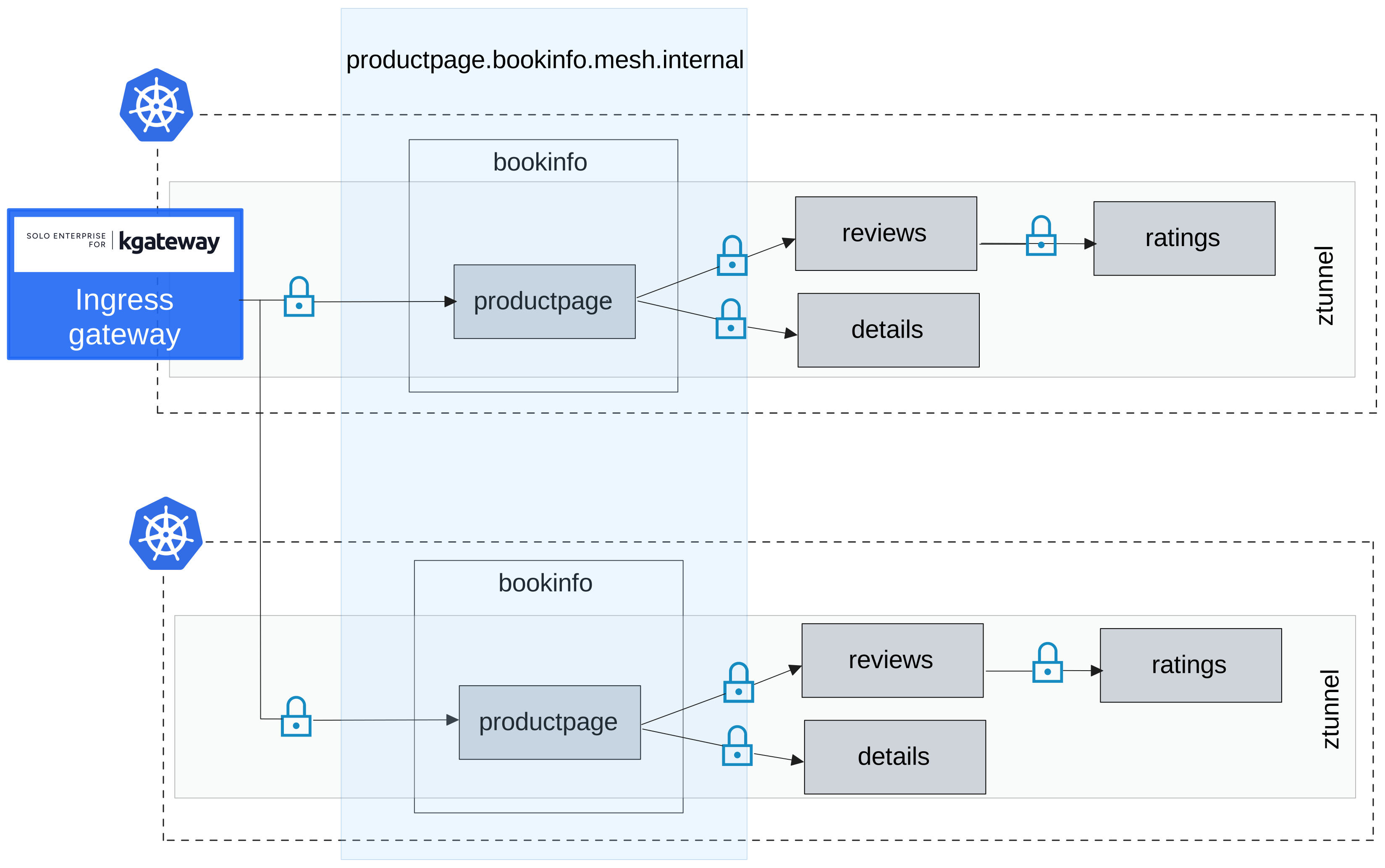
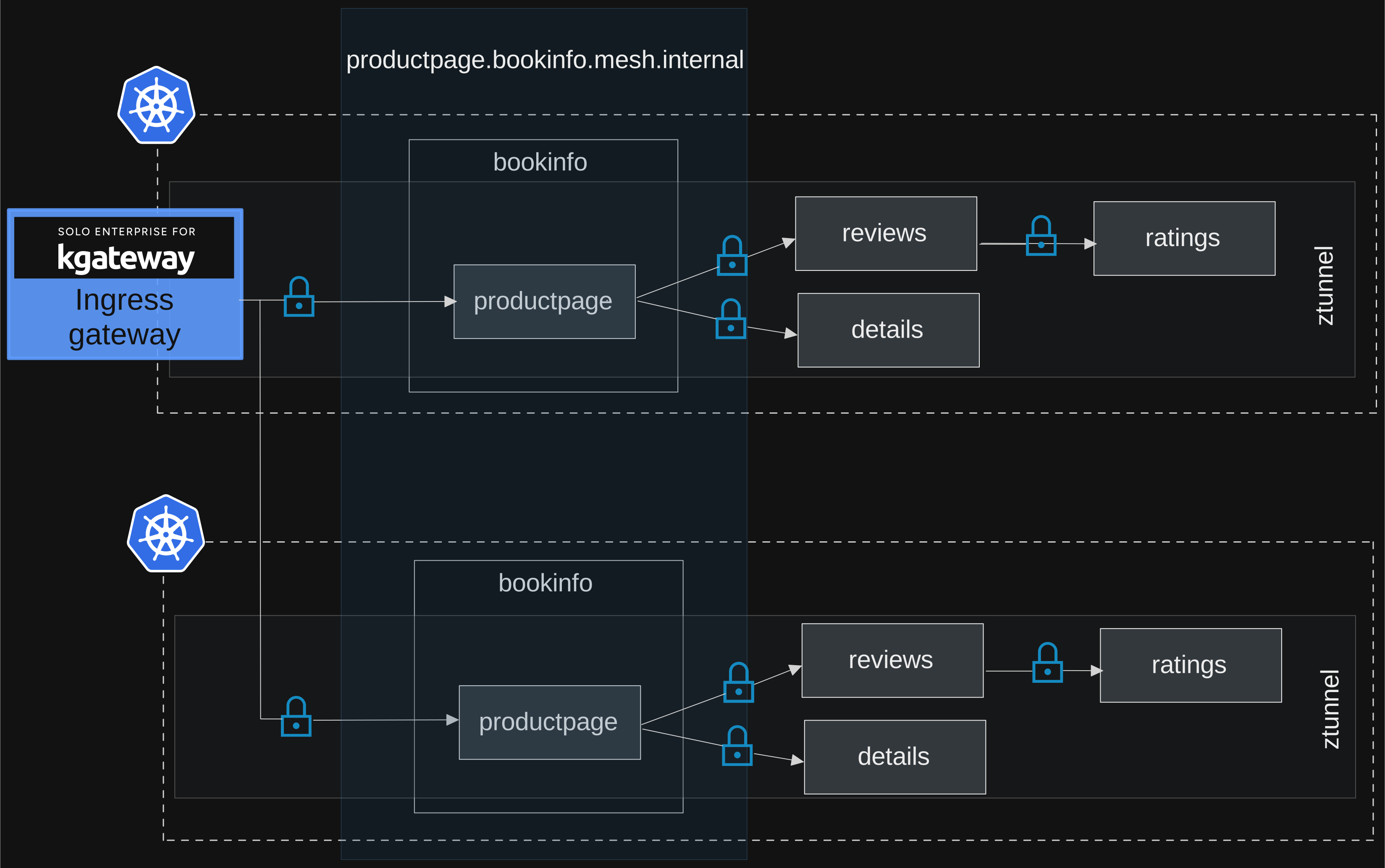
Using ingress gateways in combination with waypoints
In an ambient service mesh, both gateways and waypoint proxies can be used to route traffic, apply traffic, security, and resiliency policies, and perform authentication.
When you have a waypoint proxy for a target app, in-mesh traffic requests are always routed to the waypoint proxy for the target app first. When one in-mesh app sends a request to another in-mesh app that has a waypoint, the traffic request is sent to the waypoint proxy instead of directly to the backend app.
However, by default in Istio, ingress gateways send incoming traffic requests to backend destinations directly, even if a destination uses a waypoint. This default behavior helps prevent double handling; for example, if you created rules for traffic splitting on both the ingress gateway and a waypoint proxy, this behavior ensures that the rules are not applied twice.
This behavior requires you to add certain policies on both the gateway and the waypoint. To prevent this, you can instead enable ingress waypoint routing on a service by labeling it with istio.io/ingress-use-waypoint=true. This label configures the ingress gateway to send traffic requests to the configured waypoint, and not directly to the destination service.
If you use this service label for your waypoint-enabled services, the following approach is recommended as the ideal architecture for a fully-functioning ambient service mesh:
- Gateways: Apply minimal routing logic, such as through HTTPRoutes, that is sufficient only for selecting a backend app. Avoid applying policies to gateways, except for policies that must be applied at the edge, such as rate limiting or user authentication.
- Waypoints: Apply all other routing and policy logic.
In a peered multicluster environment with Solo Enterprise for Istio (east-west gateway peering with auto-generated ServiceEntry and WorkloadEntry resources), you only need to set istio.io/ingress-use-waypoint on the Service or namespace in the cluster where the workload runs. The peering controller propagates it automatically to connected clusters, so ingress gateways throughout the mesh route traffic through the waypoint without additional configuration.
The label uses the following precedence order:
istio.io/ingress-use-waypointlabel on the KubernetesService(highest priority). Setting the label tofalseexplicitly disables waypoint routing even if the namespace has the label set totrue.istio.io/ingress-use-waypointlabel on the namespace.- If no local
Serviceor namespace label is set, the label is inherited from remote services. If any remote cluster has the label set totrueon its service, the observing cluster treats the service as waypoint-enabled for ingress traffic.
Route objects, gateways and waypoints
Routes are configured with the Gateway API.
Two main types of routes are available:
- HTTPRoute, the most commonly used route
- GRPCRoute, a version of HTTPRoute which supports matching on gRPC request service and/or method
Two additional route types are in the Gateway API experimental channel and require Istio configuration to enable:
- TCPRoute, for managing TCP traffic
- TLSRoute, for managing TLS traffic
The same API describes both gateway-attached routes and mesh routes enacted by a waypoint. The key difference is the parentRef field: set it to a gateway name for north/south traffic, or to a service name for east/west traffic.
Using routes for gateways
To attach a route to a gateway (an ingress route), set the parentRefs field to the name of the Gateway resource. The target Gateway must allow HTTPRoutes from the route’s namespace to be attached.
The following example routes the specified paths to the productpage service:
apiVersion: gateway.networking.k8s.io/v1
kind: HTTPRoute
metadata:
  name: bookinfo
spec:
  parentRefs:
  - name: bookinfo-gateway
  rules:
  - matches:
    - path:
        type: Exact
        value: /productpage
    - path:
        type: PathPrefix
        value: /static
    - path:
        type: Exact
        value: /login
    - path:
        type: Exact
        value: /logout
    - path:
        type: PathPrefix
        value: /api/v1/products
    backendRefs:
    - name: productpage
      port: 9080
Using routes for waypoints
Attach a mesh route to a service using the parentRefs field. Note the following differences from a gateway route:
kindmust be set toServicegroupmust be set to the empty string2.
The following example takes traffic directed to the reviews service and sends 10% to reviews-v2:
apiVersion: gateway.networking.k8s.io/v1
kind: HTTPRoute
metadata:
  name: reviews
spec:
  parentRefs:
  - group: ""
    kind: Service
    name: reviews
    port: 9080
  rules:
  - backendRefs:
    - name: reviews-v1
      port: 9080
      weight: 90
    - name: reviews-v2
      port: 9080
      weight: 10
HTTPRoute considerations
Note the following differences when writing an HTTPRoute for use with a gateway versus within the mesh:
- Gateway routes set
parentRefto a gateway name; mesh routes setparentRefto a service name. - The
hostnamefield has no effect in a mesh route. - When one or more mesh routes are attached to a service, requests that do not match at least one rule in one of the routes are rejected. To act on only a subset of traffic while passing the rest through unchanged (for example, rewriting traffic matching a path prefix), include a second rule with a
backendRefsfield and nomatchesfield.