For the complete documentation index, see llms.txt. Markdown versions of all docs pages are available by appending .md to any docs URL.
Outlier detection
Use outlier detection in ambient mesh to passively identify and eject unhealthy endpoints from the load balancing pool.
Outlier detection is a form of passive health checking. Unlike health checks that proactively monitor endpoints, outlier detection performs its checking in the context of a request.
When the proxy detects that a specific workload is not healthy, the proxy stops sending requests to it for a specified period. The workload is then considered ejected. Configuring outlier detection involves specifying both of the following aspects:
- What constitutes an unhealthy workload; for example, a specific number of consecutive 5xx errors over a specific time window.
- Parameters that govern the ejection algorithm, including the ejection duration and conditions that override a decision to perform an ejection; for example, if too few instances remain in the load balancing pool.
In the following guide, you explore a simple example where a single replica is ejected for simplicity. The subsequent fault injection guide provides a second, more realistic example involving multiple replicas.
Note
Outlier detection is supported at the edge of a cluster using a gateway, or when a workload is enrolled in the waypoint layer.
Before you begin
-
Label the default namespace to add it to the ambient mesh.
kubectl label ns default istio.io/dataplane-mode=ambient -
Create a waypoint for the default namespace. A waypoint is required because this resiliency feature configures Layer 7 (L7) proxy behavior. For more information on using waypoints, see Configure waypoints.
istioctl waypoint apply -n default --enroll-namespace --wait
Configure outlier detection
Outlier detection is configured in a DestinationRule, where you specify the health threshold and the ejection parameters. The ejection time follows an algorithm based on a “base” ejection time and a multiplier that increases or decreases as a function of the application’s health.
-
Deploy the
httpbinservice and acurlclient.kubectl apply -f https://raw.githubusercontent.com/istio/istio/1.30.0/samples/httpbin/httpbin.yaml kubectl apply -f https://raw.githubusercontent.com/istio/istio/1.30.0/samples/curl/curl.yaml -
To inspect requests that return a 503 response code in subsequent steps, enable waypoint access logging. By default, waypoint logging is disabled and can be enabled by using Istio’s Telemetry API.
- Enable waypoint access logging by applying a Telemetry resource.
kubectl apply -f - <<EOF apiVersion: telemetry.istio.io/v1 kind: Telemetry metadata: name: enable-access-logging namespace: default spec: accessLogging: - providers: - name: envoy EOF - In one terminal, tail the waypoint’s logs.
kubectl logs --follow deploy/waypoint - In a second terminal, send a test request.
In the output, verify that a log entry similar to the following appears, which confirms that requests traverse the waypoint.
kubectl exec deploy/curl -- curl -s httpbin:8000/get[2026-07-07T17:03:27.660Z] "GET /get HTTP/1.1" 200 - via_upstream - "-" 0 369 4 3 "-" "curl/8.16.0" "038ef449-542f-4244-ace1-54e02d484b2a" "httpbin:8000" "envoy://connect_originate/10.244.0.26:8080" inbound-vip|8000|http|httpbin.default.svc.cluster.local envoy://internal_client_address/ 10.96.154.131:8000 10.244.0.27:42686 - default
Keep the waypoint logs open to refer to them in subsequent steps.
- Enable waypoint access logging by applying a Telemetry resource.
-
Apply a DestinationRule that considers a workload unhealthy after three consecutive 5xx errors, with a 15-second base ejection time.
kubectl apply -f - <<EOF
apiVersion: networking.istio.io/v1
kind: DestinationRule
metadata:
  name: httpbin
spec:
  host: httpbin
  trafficPolicy:
    outlierDetection:
      consecutive5xxErrors: 3
      baseEjectionTime: 15s
      maxEjectionPercent: 100
EOF
Note
maxEjectionPercentis set to 100 for this demo. A single deployed replica can be ejected even though it constitutes 100% of the workloads backing thehttpbinservice. Do not use this setting in production. -
Test outlier detection.
-
Trigger ejection by sending three consecutive failing calls.
for i in {1..3}; do kubectl exec deploy/curl -- curl -s httpbin:8000/status/500; done -
Send the following request within the 15s ejection period.
kubectl exec deploy/curl -- curl -s httpbin:8000/jsonVerify that this call fails.
no healthy upstream -
In the waypoint logs, the
UH(No Healthy Upstream) response flag confirms that the workload is ejected.[2026-07-07T17:03:39.359Z] "GET /json HTTP/1.1" 503 UH no_healthy_upstream - "-" 0 19 0 - "-" "curl/8.16.0" "70fd9d07-3146-4b8f-8163-6a5d204e1c2b" "httpbin:8000" "-" inbound-vip|8000|http|httpbin.default.svc.cluster.local - 10.96.154.131:8000 10.244.0.27:42686 - default -
After 15 seconds, confirm that a call succeeds again after the ejection period elapses.
kubectl exec deploy/curl -- curl -s httpbin:8000/json{ "slideshow": { "author": "Yours Truly", "date": "date of publication", "slides": [ { "title": "Wake up to WonderWidgets!", "type": "all" }, { "items": [ "Why <em>WonderWidgets</em> are great", "Who <em>buys</em> WonderWidgets" ], "title": "Overview", "type": "ul" } ], "title": "Sample Slide Show" } }
-
Note that triggering more ejections causes a multiplier to increase ejection times further. After a healthy period, the multiplier decreases.
Outlier detection metrics
By default, Istio configures Envoy to record a minimal set of statistics to reduce overall CPU and memory footprint. Outlier detection metrics are not included by default, and you must configure Istio to include them in the following steps. After you enable the metrics, ejections are reflected in metrics such as envoy_cluster_outlier_detection_ejections_enforced_total. Through these and other outlier-detection related metrics, development teams can monitor ejections as a possible indication of application issues.
-
Configure circuit breaking metrics collection.
-
Save the following Helm values to a file named
mesh-config.yaml.cat > mesh-config.yaml <<EOF meshConfig: defaultConfig: proxyStatsMatcher: inclusionRegexps: - ".*outlier_detection.*" - ".*upstream_rq_retry.*" - ".*upstream_rq_pending.*" - ".*upstream_cx_.*" inclusionSuffixes: - "upstream_rq_timeout" EOF -
Upgrade the
istiodchart with the updated configuration.helm upgrade istiod istio/istiod \ --namespace istio-system \ --reuse-values \ --values mesh-config.yaml \ --wait -
Restart the waypoint to pick up the updated configuration.
kubectl rollout restart deploy waypoint
-
-
Deploy Prometheus to the cluster.
kubectl apply -f https://raw.githubusercontent.com/istio/istio/1.30.0/samples/addons/prometheus.yaml -
Connect to the Prometheus dashboard.
istioctl dashboard prometheus -
Query for outlier detection metrics such as
envoy_cluster_outlier_detection_ejections_enforced_totalandenvoy_cluster_outlier_detection_ejections_enforced_consecutive_5xx.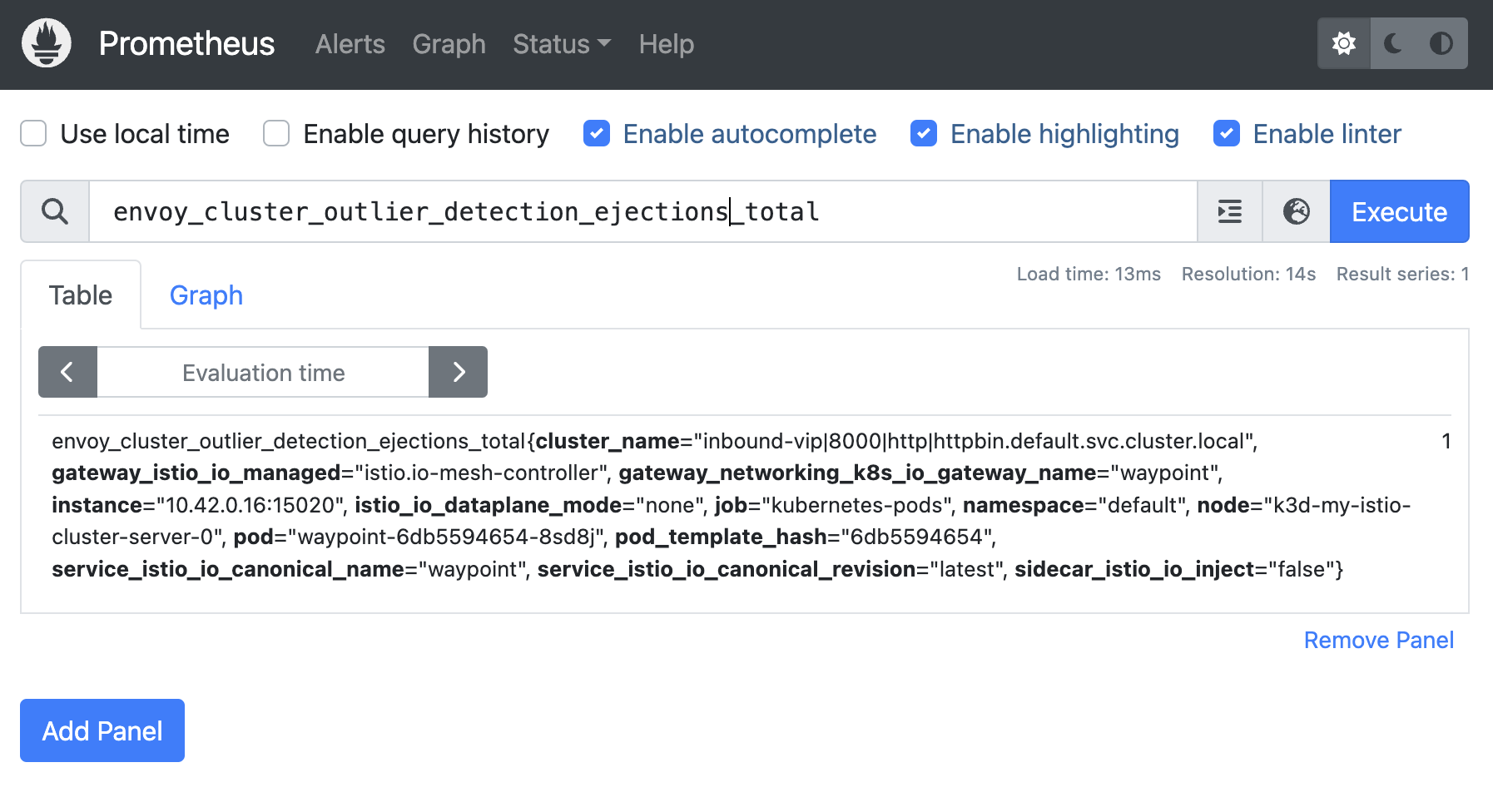
Figure: Total ejections counter in Prometheus Figure: Total ejections counter in Prometheus
Outlier detection events
Envoy can be configured to log specific outlier detection events. Enable this by setting the global.proxy.outlierLogPath Helm field when installing or upgrading Istio.
Note
In ambient mode, the outlierLogPath configuration applies to sidecar proxies but does not propagate to waypoint proxies. The waypoint pod spec is generated and reconciled by the gateway controller, which does not pass proxy startup flags from the Istio mesh config. Outlier event logging from waypoints is not currently supported through this mechanism.
-
Get the current values for the istiod Helm release in your cluster.
helm get values istiod -n istio-system -o yaml > istiod.yaml open istiod.yaml -
Add the following settings to your Helm values file.
global: proxy: outlierLogPath: /dev/stdout -
Apply the change by upgrading the istiod chart.
helm upgrade istiod istio/istiod \ --namespace istio-system \ --values istiod.yaml \ --wait -
Restart your waypoint to pick up the updated configuration.
kubectl rollout restart deploy waypoint
The following example messages show an ejection event caused by consecutive 500-type errors, and a subsequent corresponding “uneject” event when the workload is returned to the pool:
{
  "type": "CONSECUTIVE_5XX",
  "timestamp": "2024-12-07T19:30:13.724Z",
  "cluster_name": "inbound-vip|8000|http|httpbin.default.svc.cluster.local",
  "upstream_url": "envoy://connect_originate/10.42.0.8:8080",
  "action": "EJECT",
  "num_ejections": 1,
  "enforced": true,
  "eject_consecutive_event": {}
}
{
  "type": "CONSECUTIVE_5XX",
  "timestamp": "2024-12-07T19:30:37.384Z",
  "secs_since_last_action": "23",
  "cluster_name": "inbound-vip|8000|http|httpbin.default.svc.cluster.local",
  "upstream_url": "envoy://connect_originate/10.42.0.8:8080",
  "action": "UNEJECT",
  "num_ejections": 1,
  "enforced": false
}
Cleanup
Delete the sample resources.
kubectl delete -f https://raw.githubusercontent.com/istio/istio/1.30.0/samples/addons/prometheus.yaml
kubectl delete destinationrule httpbin
istioctl waypoint delete -n default waypoint
kubectl delete -f https://raw.githubusercontent.com/istio/istio/1.30.0/samples/httpbin/httpbin.yaml
kubectl delete -f https://raw.githubusercontent.com/istio/istio/1.30.0/samples/curl/curl.yaml